「App:Library:LVGL:docs:Widgets:Base object」の版間の差分
(→API) |
|||
| 1行目: | 1行目: | ||
https://docs.lvgl.io/8.2/widgets/index.html | https://docs.lvgl.io/8.2/widgets/index.html | ||
__NOTOC__ | __NOTOC__ | ||
| + | = Base object (lv_obj) = | ||
| + | == Overview == | ||
{| class="wikitable" | {| class="wikitable" | ||
!英文 | !英文 | ||
| 6行目: | 8行目: | ||
|- | |- | ||
| | | | ||
| − | |||
| − | |||
| − | |||
| − | |||
| − | |||
| − | |||
| − | |||
| − | |||
The 'Base Object' implements the basic properties of widgets on a screen, such as: | The 'Base Object' implements the basic properties of widgets on a screen, such as: | ||
| 29行目: | 23行目: | ||
The Base object can be directly used as a simple widget: it's nothing more than a rectangle. In HTML terms, think of it as a <code style="color: #bb0000;"><nowiki><div></nowiki></code>. | The Base object can be directly used as a simple widget: it's nothing more than a rectangle. In HTML terms, think of it as a <code style="color: #bb0000;"><nowiki><div></nowiki></code>. | ||
| + | | | ||
| + | |} | ||
| + | |||
=== Coordinates === | === Coordinates === | ||
| + | {| class="wikitable" | ||
| + | !英文 | ||
| + | !自動翻訳 | ||
| + | |- | ||
| + | | | ||
Only a small subset of coordinate settings is described here. To see all the features of LVGL (padding, coordinates in styles, layouts, etc) visit the Coordinates page. | Only a small subset of coordinate settings is described here. To see all the features of LVGL (padding, coordinates in styles, layouts, etc) visit the Coordinates page. | ||
| + | | | ||
| + | |} | ||
| + | |||
==== Size ==== | ==== Size ==== | ||
| + | {| class="wikitable" | ||
| + | !英文 | ||
| + | !自動翻訳 | ||
| + | |- | ||
| + | | | ||
The object size can be modified on individual axes with <code style="color: #bb0000;">lv_obj_set_width(obj, new_width)</code> and <code style="color: #bb0000;">lv_obj_set_height(obj, new_height)</code>, or both axes can be modified at the same time with <code style="color: #bb0000;">lv_obj_set_size(obj, new_width, new_height)</code>. | The object size can be modified on individual axes with <code style="color: #bb0000;">lv_obj_set_width(obj, new_width)</code> and <code style="color: #bb0000;">lv_obj_set_height(obj, new_height)</code>, or both axes can be modified at the same time with <code style="color: #bb0000;">lv_obj_set_size(obj, new_width, new_height)</code>. | ||
| + | | | ||
| + | |} | ||
| + | |||
==== Position ==== | ==== Position ==== | ||
| + | {| class="wikitable" | ||
| + | !英文 | ||
| + | !自動翻訳 | ||
| + | |- | ||
| + | | | ||
You can set the position relative to the parent with <code style="color: #bb0000;">lv_obj_set_x(obj, new_x)</code> and <code style="color: #bb0000;">lv_obj_set_y(obj, new_y)</code>, or both axes at the same time with <code style="color: #bb0000;">lv_obj_set_pos(obj, new_x, new_y)</code>. | You can set the position relative to the parent with <code style="color: #bb0000;">lv_obj_set_x(obj, new_x)</code> and <code style="color: #bb0000;">lv_obj_set_y(obj, new_y)</code>, or both axes at the same time with <code style="color: #bb0000;">lv_obj_set_pos(obj, new_x, new_y)</code>. | ||
| + | | | ||
| + | |} | ||
| + | |||
==== Alignment ==== | ==== Alignment ==== | ||
| + | {| class="wikitable" | ||
| + | !英文 | ||
| + | !自動翻訳 | ||
| + | |- | ||
| + | | | ||
You can align the object on its parent with <code style="color: #bb0000;">lv_obj_set_align(obj, LV_ALIGN_...)</code>. After this every x and y setting will be relative to the set alignment mode. For example, this will shift the object by 10;20 px from the center of its parent: | You can align the object on its parent with <code style="color: #bb0000;">lv_obj_set_align(obj, LV_ALIGN_...)</code>. After this every x and y setting will be relative to the set alignment mode. For example, this will shift the object by 10;20 px from the center of its parent: | ||
<syntaxhighlight lang="C++" style="border: 1px dashed gray;"> | <syntaxhighlight lang="C++" style="border: 1px dashed gray;"> | ||
| 55行目: | 81行目: | ||
The following align types exist: | The following align types exist: | ||
[[file:LVGL docs widgets obj 01.png|link=https://docs.lvgl.io/8.2/widgets/obj.html#alignment]] | [[file:LVGL docs widgets obj 01.png|link=https://docs.lvgl.io/8.2/widgets/obj.html#alignment]] | ||
| − | + | | | |
| + | |} | ||
=== Parents and children === | === Parents and children === | ||
| + | {| class="wikitable" | ||
| + | !英文 | ||
| + | !自動翻訳 | ||
| + | |- | ||
| + | | | ||
You can set a new parent for an object with <code style="color: #bb0000;">lv_obj_set_parent(obj, new_parent)</code>. To get the current parent, use <code style="color: #bb0000;">lv_obj_get_parent(obj)</code>. | You can set a new parent for an object with <code style="color: #bb0000;">lv_obj_set_parent(obj, new_parent)</code>. To get the current parent, use <code style="color: #bb0000;">lv_obj_get_parent(obj)</code>. | ||
| 86行目: | 118行目: | ||
You can swap the position of two objects with <code style="color: #bb0000;">lv_obj_swap(obj1, obj2)</code>. | You can swap the position of two objects with <code style="color: #bb0000;">lv_obj_swap(obj1, obj2)</code>. | ||
| + | | | ||
| + | |} | ||
| + | |||
=== Display and Screens === | === Display and Screens === | ||
| + | {| class="wikitable" | ||
| + | !英文 | ||
| + | !自動翻訳 | ||
| + | |- | ||
| + | | | ||
At the highest level of the LVGL object hierarchy is the ''display'' which represents the driver for a display device (physical display or simulator). A display can have one or more screens associated with it. Each screen contains a hierarchy of objects for graphical widgets representing a layout that covers the entire display. | At the highest level of the LVGL object hierarchy is the ''display'' which represents the driver for a display device (physical display or simulator). A display can have one or more screens associated with it. Each screen contains a hierarchy of objects for graphical widgets representing a layout that covers the entire display. | ||
| 97行目: | 137行目: | ||
To get an object's screen use the <code style="color: #bb0000;">lv_obj_get_screen(obj)</code> function. | To get an object's screen use the <code style="color: #bb0000;">lv_obj_get_screen(obj)</code> function. | ||
| + | | | ||
| + | |} | ||
| + | |||
=== Events === | === Events === | ||
| + | {| class="wikitable" | ||
| + | !英文 | ||
| + | !自動翻訳 | ||
| + | |- | ||
| + | | | ||
To set an event callback for an object, use <code style="color: #bb0000;">lv_obj_add_event_cb(obj, event_cb, LV_EVENT_..., user_data)</code>, | To set an event callback for an object, use <code style="color: #bb0000;">lv_obj_add_event_cb(obj, event_cb, LV_EVENT_..., user_data)</code>, | ||
| 105行目: | 153行目: | ||
Read the Event overview to learn more about events. | Read the Event overview to learn more about events. | ||
| + | | | ||
| + | |} | ||
| + | |||
=== Styles === | === Styles === | ||
| + | {| class="wikitable" | ||
| + | !英文 | ||
| + | !自動翻訳 | ||
| + | |- | ||
| + | | | ||
Be sure to read the Style overview. Here only the most essential functions are described. | Be sure to read the Style overview. Here only the most essential functions are described. | ||
| 113行目: | 169行目: | ||
The base objects use <code style="color: #bb0000;">LV_PART_MAIN</code> style properties and <code style="color: #bb0000;">LV_PART_SCROLLBAR</code> with the typical background style properties. | The base objects use <code style="color: #bb0000;">LV_PART_MAIN</code> style properties and <code style="color: #bb0000;">LV_PART_SCROLLBAR</code> with the typical background style properties. | ||
| + | | | ||
| + | |} | ||
| + | |||
=== Flags === | === Flags === | ||
| − | + | {| class="wikitable" | |
| + | !英文 | ||
| + | !自動翻訳 | ||
| + | |- | ||
* <code style="color: #bb0000;">LV_OBJ_FLAG_HIDDEN</code> Make the object hidden. (Like it wasn't there at all) | * <code style="color: #bb0000;">LV_OBJ_FLAG_HIDDEN</code> Make the object hidden. (Like it wasn't there at all) | ||
| 156行目: | 218行目: | ||
lv_obj_clear_flag(obj, LV_OBJ_FLAG_CLICKABLE); | lv_obj_clear_flag(obj, LV_OBJ_FLAG_CLICKABLE); | ||
</syntaxhighlight> | </syntaxhighlight> | ||
| + | | | ||
| + | |} | ||
| + | |||
=== Groups === | === Groups === | ||
| + | {| class="wikitable" | ||
| + | !英文 | ||
| + | !自動翻訳 | ||
| + | |- | ||
| + | | | ||
Read the Input devices overview to learn more about ''Groups''. | Read the Input devices overview to learn more about ''Groups''. | ||
| 164行目: | 234行目: | ||
<code style="color: #bb0000;">lv_obj_is_focused(obj)</code> returns if the object is currently focused on its group or not. If the object is not added to a group, <code style="color: #bb0000;">false</code> will be returned. | <code style="color: #bb0000;">lv_obj_is_focused(obj)</code> returns if the object is currently focused on its group or not. If the object is not added to a group, <code style="color: #bb0000;">false</code> will be returned. | ||
| + | | | ||
| + | |} | ||
=== Extended click area === | === Extended click area === | ||
| + | {| class="wikitable" | ||
| + | !英文 | ||
| + | !自動翻訳 | ||
| + | |- | ||
| + | | | ||
By default, the objects can be clicked only within their bounding area. However, this can be extended with <code style="color: #bb0000;">lv_obj_set_ext_click_area(obj, size)</code>. | By default, the objects can be clicked only within their bounding area. However, this can be extended with <code style="color: #bb0000;">lv_obj_set_ext_click_area(obj, size)</code>. | ||
| + | | | ||
| + | |} | ||
| + | |||
== Events == | == Events == | ||
| + | {| class="wikitable" | ||
| + | !英文 | ||
| + | !自動翻訳 | ||
| + | |- | ||
| + | | | ||
* <code style="color: #bb0000;">LV_EVENT_VALUE_CHANGED</code> when the <code style="color: #bb0000;">LV_OBJ_FLAG_CHECKABLE</code> flag is enabled and the object clicked (on transition to/from the checked state) | * <code style="color: #bb0000;">LV_EVENT_VALUE_CHANGED</code> when the <code style="color: #bb0000;">LV_OBJ_FLAG_CHECKABLE</code> flag is enabled and the object clicked (on transition to/from the checked state) | ||
* <code style="color: #bb0000;">LV_EVENT_DRAW_PART_BEGIN</code> and <code style="color: #bb0000;">LV_EVENT_DRAW_PART_END</code> is sent for the following types: | * <code style="color: #bb0000;">LV_EVENT_DRAW_PART_BEGIN</code> and <code style="color: #bb0000;">LV_EVENT_DRAW_PART_END</code> is sent for the following types: | ||
| 186行目: | 271行目: | ||
Learn more about Events. | Learn more about Events. | ||
| + | | | ||
| + | |} | ||
| + | |||
== Keys == | == Keys == | ||
| + | {| class="wikitable" | ||
| + | !英文 | ||
| + | !自動翻訳 | ||
| + | |- | ||
| + | | | ||
If <code style="color: #bb0000;">LV_OBJ_FLAG_CHECKABLE</code> is enabled, <code style="color: #bb0000;">LV_KEY_RIGHT</code> and <code style="color: #bb0000;">LV_KEY_UP</code> make the object checked, and <code style="color: #bb0000;">LV_KEY_LEFT</code> and <code style="color: #bb0000;">LV_KEY_DOWN</code> make it unchecked. | If <code style="color: #bb0000;">LV_OBJ_FLAG_CHECKABLE</code> is enabled, <code style="color: #bb0000;">LV_KEY_RIGHT</code> and <code style="color: #bb0000;">LV_KEY_UP</code> make the object checked, and <code style="color: #bb0000;">LV_KEY_LEFT</code> and <code style="color: #bb0000;">LV_KEY_DOWN</code> make it unchecked. | ||
| 193行目: | 286行目: | ||
Learn more about Keys. | Learn more about Keys. | ||
| + | | | ||
| + | |} | ||
| + | |||
== Example == | == Example == | ||
=== Base objects with custom styles === | === Base objects with custom styles === | ||
| − | + | {| class="wikitable" | |
| − | + | !英文 | |
| − | + | !自動翻訳 | |
| + | |- | ||
=== Make an object draggable === | === Make an object draggable === | ||
[[file:LVGL docs example 043.png|link=https://docs.lvgl.io/8.2/widgets/obj.html#make-an-object-draggable]] | [[file:LVGL docs example 043.png|link=https://docs.lvgl.io/8.2/widgets/obj.html#make-an-object-draggable]] | ||
| − | + | | | |
| − | + | |} | |
== API == | == API == | ||
| + | {| class="wikitable" | ||
| + | !英文 | ||
| + | !自動翻訳 | ||
| + | |- | ||
| + | | | ||
Typedefs | Typedefs | ||
| 545行目: | 647行目: | ||
:: | :: | ||
:<span style="background-color: #eeeeee;">uint16_t w_layout</span> | :<span style="background-color: #eeeeee;">uint16_t w_layout</span> | ||
| + | | | ||
| + | |} | ||
:[[App:Library:LVGL#Widgets|戻る : Previous]] | :[[App:Library:LVGL#Widgets|戻る : Previous]] | ||
2022年6月28日 (火) 17:28時点における版
https://docs.lvgl.io/8.2/widgets/index.html
Base object (lv_obj)
Overview
| 英文 | 自動翻訳 |
|---|---|
|
The 'Base Object' implements the basic properties of widgets on a screen, such as:
The functions and functionalities of the Base object can be used with other widgets too. For example
|
Coordinates
| 英文 | 自動翻訳 |
|---|---|
|
Only a small subset of coordinate settings is described here. To see all the features of LVGL (padding, coordinates in styles, layouts, etc) visit the Coordinates page. |
Size
| 英文 | 自動翻訳 |
|---|---|
|
The object size can be modified on individual axes with |
Position
| 英文 | 自動翻訳 |
|---|---|
|
You can set the position relative to the parent with |
Alignment
| 英文 | 自動翻訳 |
|---|---|
|
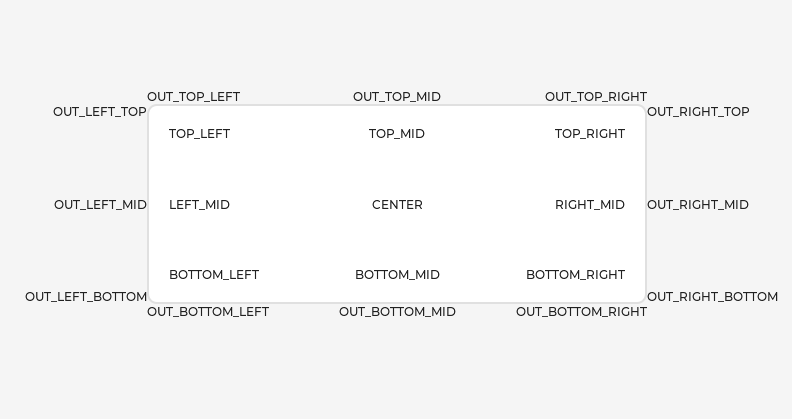
You can align the object on its parent with
 lv_obj_set_align(obj, LV_ALIGN_CENTER);
 lv_obj_set_pos(obj, 10, 20);

 //Or in one function
 lv_obj_align(obj, LV_ALIGN_CENTER, 10, 20);
To align one object to another use:
The following align types exist:
|
Parents and children
| 英文 | 自動翻訳 |
|---|---|
|
You can set a new parent for an object with
 uint32_t i;
 for(i = 0i < lv_obj_get_child_cnt(parent)i++) {
   lv_obj_t * child = lv_obj_get_child(parent, i);
   /*Do something with child*/
 }
You can change the index of an object in its parent using
|
Display and Screens
| 英文 | 自動翻訳 |
|---|---|
|
At the highest level of the LVGL object hierarchy is the display which represents the driver for a display device (physical display or simulator). A display can have one or more screens associated with it. Each screen contains a hierarchy of objects for graphical widgets representing a layout that covers the entire display.
If you have multiple displays, it's important to know that the screen functions operate on the most recently created display or the one explicitly selected with
|
Events
| 英文 | 自動翻訳 |
|---|---|
|
To set an event callback for an object, use
Read the Event overview to learn more about events. |
Styles
| 英文 | 自動翻訳 |
|---|---|
|
Be sure to read the Style overview. Here only the most essential functions are described.
The base objects use |
Flags
LV_OBJ_FLAG_HIDDENMake the object hidden. (Like it wasn't there at all)LV_OBJ_FLAG_CLICKABLEMake the object clickable by input devicesLV_OBJ_FLAG_CLICK_FOCUSABLEAdd focused state to the object when clickedLV_OBJ_FLAG_CHECKABLEToggle checked state when the object is clickedLV_OBJ_FLAG_SCROLLABLEMake the object scrollableLV_OBJ_FLAG_SCROLL_ELASTICAllow scrolling inside but with slower speedLV_OBJ_FLAG_SCROLL_MOMENTUMMake the object scroll further when "thrown"LV_OBJ_FLAG_SCROLL_ONEAllow scrolling only one snappable childrenLV_OBJ_FLAG_SCROLL_CHAIN_HORAllow propagating the horizontal scroll to a parentLV_OBJ_FLAG_SCROLL_CHAIN_VERAllow propagating the vertical scroll to a parentLV_OBJ_FLAG_SCROLL_CHAINSimple packaging for (LV_OBJ_FLAG_SCROLL_CHAIN_HOR | LV_OBJ_FLAG_SCROLL_CHAIN_VER)LV_OBJ_FLAG_SCROLL_ON_FOCUSAutomatically scroll object to make it visible when focusedLV_OBJ_FLAG_SCROLL_WITH_ARROWAllow scrolling the focused object with arrow keysLV_OBJ_FLAG_SNAPPABLEIf scroll snap is enabled on the parent it can snap to this objectLV_OBJ_FLAG_PRESS_LOCKKeep the object pressed even if the press slid from the objectLV_OBJ_FLAG_EVENT_BUBBLEPropagate the events to the parent tooLV_OBJ_FLAG_GESTURE_BUBBLEPropagate the gestures to the parentLV_OBJ_FLAG_ADV_HITTESTAllow performing more accurate hit (click) test. E.g. accounting for rounded cornersLV_OBJ_FLAG_IGNORE_LAYOUTMake the object positionable by the layoutsLV_OBJ_FLAG_FLOATINGDo not scroll the object when the parent scrolls and ignore layoutLV_OBJ_FLAG_OVERFLOW_VISIBLEDo not clip the children's content to the parent's boundaryLV_OBJ_FLAG_LAYOUT_1Custom flag, free to use by layoutsLV_OBJ_FLAG_LAYOUT_2Custom flag, free to use by layoutsLV_OBJ_FLAG_WIDGET_1Custom flag, free to use by widgetLV_OBJ_FLAG_WIDGET_2Custom flag, free to use by widgetLV_OBJ_FLAG_USER_1Custom flag, free to use by userLV_OBJ_FLAG_USER_2Custom flag, free to use by userLV_OBJ_FLAG_USER_3Custom flag, free to use by userLV_OBJ_FLAG_USER_4Custom flag, free to use by user
 /*Hide on object*/
 lv_obj_add_flag(obj, LV_OBJ_FLAG_HIDDEN);

 /*Make an object non-clickable*/
 lv_obj_clear_flag(obj, LV_OBJ_FLAG_CLICKABLE);
| 英文 | 自動翻訳 |
|---|---|
Groups
| 英文 | 自動翻訳 |
|---|---|
|
Read the Input devices overview to learn more about Groups.
|
Extended click area
| 英文 | 自動翻訳 |
|---|---|
|
By default, the objects can be clicked only within their bounding area. However, this can be extended with |
Events
| 英文 | 自動翻訳 |
|---|---|
Learn more about Events. |
Keys
| 英文 | 自動翻訳 |
|---|---|
|
If If Learn more about Keys. |
Example
Base objects with custom styles
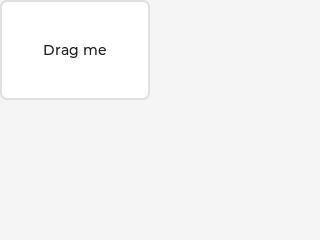
Make an object draggable
| 英文 | 自動翻訳 |
|---|---|
API
| 英文 | 自動翻訳 |
|---|---|
|
Typedefs typedef uint16_t lv_state_t typedef uint32_t lv_part_t typedef uint32_t lv_obj_flag_t typedef struct _lv_obj_t lv_obj_t Enums enum [anonymous]
enum [anonymous]
enum [anonymous]
enum lv_obj_draw_part_type_t
Functions void lv_init(void)
void lv_deinit(void)
bool lv_is_initialized(void)
lv_obj_t *lv_obj_create(lv_obj_t *parent)
void lv_obj_add_flag(lv_obj_t *obj, lv_obj_flag_t f)
void lv_obj_clear_flag(lv_obj_t *obj, lv_obj_flag_t f)
void lv_obj_add_state(lv_obj_t *obj, lv_state_t state)
void lv_obj_clear_state(lv_obj_t *obj, lv_state_t state)
static inline void lv_obj_set_user_data(lv_obj_t *obj, void *user_data)
bool lv_obj_has_flag(const lv_obj_t *obj, lv_obj_flag_t f)
bool lv_obj_has_flag_any(const lv_obj_t *obj, lv_obj_flag_t f)
lv_state_t lv_obj_get_state(const lv_obj_t *obj)
bool lv_obj_has_state(const lv_obj_t *obj, lv_state_t state)
void *lv_obj_get_group(const lv_obj_t *obj)
static inline void *lv_obj_get_user_data(lv_obj_t *obj)
void lv_obj_allocate_spec_attr(lv_obj_t *obj)
bool lv_obj_check_type(const lv_obj_t *obj, const lv_obj_class_t *class_p)
bool lv_obj_has_class(const lv_obj_t *obj, const lv_obj_class_t *class_p)
const lv_obj_class_t *lv_obj_get_class(const lv_obj_t *obj)
bool lv_obj_is_valid(const lv_obj_t *obj)
static inline lv_coord_t lv_obj_dpx(const lv_obj_t *obj, lv_coord_t n)
Variables const lv_obj_class_t lv_obj_class
struct _lv_obj_spec_attr_t
|
